프로젝트를 진행하다보면 대량의 데이터를 삽입 및 수정해야할 때가 있다. 이 경우 사용되는 다양한 방법들과 Spring JDBC Batch Insert를 활용하여 성능 최적화를 하는 방법을 알아보자.
본 글에서는 더미 데이터 10만개를 생성하여 성능을 테스트 할 예정이며, 이를 위해 'data faker' 라이브러리를 사용하였다.
https://www.datafaker.net/documentation/getting-started/
JPA의 save()와 saveAll() 성능 테스트
@SpringBootTest
class AdminSpotServiceTest {

    private final Faker faker = new Faker(new Locale("ko"));

    private static final Integer INSERT_NUM = 100_000;

    @Autowired
    private SpotRepository spotRepository;

	...

    @Test
    void save_메서드를_사용하여_INSERT한다() {
        Integer capacity = faker.number().numberBetween(100, 1000);

        for (int i = 0; i < INSERT_NUM; i++) {
            Spot spot = Spot.builder()
                    .name(faker.restaurant().name())
                    .maxCapacity(capacity)
                    .remainingCapacity(capacity)
                    .address(faker.address().fullAddress())
                    .userId(1L)
                    .build();

            spotRepository.save(spot);
        }
    }

    @Test
    void saveAll_메서드를_사용하여_INSERT한다() {
        Integer capacity = faker.number().numberBetween(100, 1000);
        List<Spot> spots = new ArrayList<>();

        for (int i = 0; i < INSERT_NUM; i++) {
            Spot spot = Spot.builder()
                    .name(faker.restaurant().name())
                    .maxCapacity(capacity)
                    .remainingCapacity(capacity)
                    .address(faker.address().fullAddress())
                    .userId(1L)
                    .build();
            spots.add(spot);
        }

        spotRepository.saveAll(spots);
    }

	...
}
우선 JPA의 save()메서드와 saveAll() 메서드를 사용하여 테스트 코드를 작성해보았다. 각각의 테스트 코드를 10회씩 수행한 후 평균 실행시간을 도출했다.
| save() | saveAll() | |
| 10만건 INSERT | 18.5초 | 14.5초 |
결과는 위와 같이 saveAll() 메서드가 save() 메서드에 비해 대략 21.6% 정도 실행시간이 감소한 것을 확인할 수 있었다. 두 메서드는 어떤 동작 방식의 차이가 있어 성능적인 차이가 발생할까? 각각의 메서드가 어떻게 구현되어 있는지 확인해보았다.

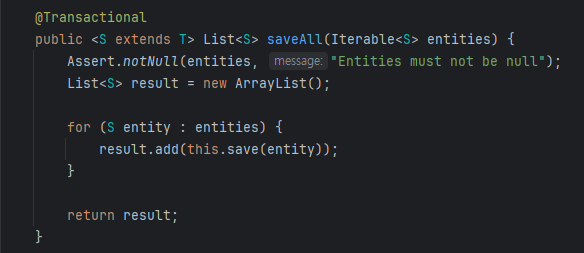
saveAll() 메서드를 확인해보면 내부적으로 save() 메서드를 반복해서 호출하는 것을 확인할 수 있다. 그러면 두 테스트 코드 사이에는 성능적 차이가 없어야 하는것이 아닐까?
둘 사이에 성능적인 차이가 발생하는 이유는 '트랜잭션 호출 횟수'가 다르기 때문이다. save() 메서드와 saveAll() 메서드 모두 @Transactional 어노테이션이 선언되어 있는 것을 확인할 수 있다. @Transactional 어노테이션이 선언되어있는 경우 해당 메서드를 하나의 트랜잭션 안에서 처리한다. 또한 각각의 메서드는 @Transactional 전파 속성이 별도로 설정되어 있지 않아 default 속성인 'REQUIRED'가 적용되어 있다. 'REQUIRED' 속성의 경우 상위 트랜잭션이 존재할 경우 합류하며, 상위 트랜잭션이 존재하지 않을 경우 새 트랜잭션을 생성하는 특징을 가진다.
이를 위 테스트 코드에 대입해보면, save() 메서드의 경우 반복문을 돌며 10만번 호출되고 있기 때문에 10만번의 새로운 트랜잭션이 생성된다. 이와 달리 saveAll() 메서드의 경우 내부적으로 save() 메서드가 동작할 때 새로운 트랜잭션이 호출되는 대신 saveAll()을 호출했을 때 생성된 상위 트랜잭션으로 합류하기 때문에 성능상 이점을 가지게 된다.
Spring JDBC Batch Insert 성능 테스트
@SpringBootTest
class AdminSpotServiceTest {

    private final Faker faker = new Faker(new Locale("ko"));

    private static final Integer INSERT_NUM = 100_000;
    private static final int BATCH_SIZE = 1_000; // 배치 크기
    private static final int THREAD_POOL_SIZE = 4; // CPU 코어 수 기반 스레드 풀

    @Autowired
    private SpotRepository spotRepository;

    @Autowired
    private JdbcTemplate jdbcTemplate;

    @Autowired
    private TransactionTemplate transactionTemplate;

	...

    @Test
    void jdbc_batch_insert를_사용하여_INSERT한다() throws InterruptedException {
        String sql = "INSERT INTO spots (" +
                "max_capacity, " +
                "remaining_capacity, " +
                "user_id, " +
                "address, " +
                "name, " +
                "status, " +
                "version" +
                ") " +
                "VALUES (?, ?, ?, ?, ?, ?, ?)";

        jdbcTemplate.batchUpdate(sql, new BatchPreparedStatementSetter() {
            @Override
            public void setValues(PreparedStatement ps, int i) throws SQLException {
                Long maxCapacity = (long) faker.number().numberBetween(100, 1000);
                ps.setLong(1, maxCapacity);
                ps.setLong(2, maxCapacity);
                ps.setLong(3, 1L);
                ps.setString(4, faker.address().fullAddress());
                ps.setString(5, faker.restaurant().name());
                ps.setString(6, "WAITING");
                ps.setLong(7, 1L);
            }

            @Override
            public int getBatchSize() {
                return INSERT_NUM;
            }
        });
    }

    @Test
    void 멀티_쓰레드와_jdbc_batch_insert를_사용하여_INSERT한다() throws InterruptedException {
        String sql = "INSERT INTO spots (" +
                "max_capacity, " +
                "remaining_capacity, " +
                "user_id, " +
                "address, " +
                "name, " +
                "status, " +
                "version" +
                ") VALUES (?, ?, ?, ?, ?, ?, ?)";
        int totalBatches = INSERT_NUM / BATCH_SIZE;
        ExecutorService executor = Executors.newFixedThreadPool(THREAD_POOL_SIZE);

        for (int batch = 0; batch < totalBatches; batch++) {
            final int currentBatch = batch;
            executor.submit(() -> {
                List<Object[]> batchList = new ArrayList<>(BATCH_SIZE);

                // 배치 데이터 생성
                for (int i = 0; i < BATCH_SIZE; i++) {
                    Long maxCapacity = (long) faker.number().numberBetween(100, 1000);
                    Long remainingCapacity = maxCapacity;
                    Long userId = 1L;
                    String address = faker.address().fullAddress();
                    String name = faker.restaurant().name();
                    String status = "WAITING";
                    Long version = 1L;

                    batchList.add(new Object[]{
                            maxCapacity, remainingCapacity, userId, address, name, status, version
                    });
                }

                transactionTemplate.execute(status -> {
                            // 배치 삽입
                            jdbcTemplate.batchUpdate(sql, new BatchPreparedStatementSetter() {
                                @Override
                                public void setValues(PreparedStatement ps, int i) throws SQLException {
                                    Object[] values = batchList.get(i);
                                    ps.setLong(1, (Long) values[0]);
                                    ps.setLong(2, (Long) values[1]);
                                    ps.setLong(3, (Long) values[2]);
                                    ps.setString(4, (String) values[3]);
                                    ps.setString(5, (String) values[4]);
                                    ps.setString(6, (String) values[5]);
                                    ps.setLong(7, (Long) values[6]);
                                }

                                @Override
                                public int getBatchSize() {
                                    return batchList.size();
                                }
                            });
                            return null;
                        }
                );

                System.out.printf("Inserted %d/%d records (%.2f%%)%n",
                        (currentBatch + 1) * BATCH_SIZE, INSERT_NUM,
                        ((currentBatch + 1) * BATCH_SIZE * 100.0) / INSERT_NUM);


            });
        }

        executor.shutdown();
        if (!executor.awaitTermination(1, TimeUnit.HOURS)) {
            System.err.println("Tasks did not finish in time!");
        }
    }

	...

 }
성능을 조금 더 개선하기 위해 Spring JDBC를 도입하여 테스트 코드를 작성해보았다.
| JDBC insert | JDBC insert (with multi thread) | |
| 10만건 INSERT | 6초 | 2.5초 |
JDBC로 데이터를 삽입할 경우 saveAll() 메서드를 사용했을 때 보다 실행시간이 58.6% 감소했다. 심지어 JDBC에 멀티 쓰레드와 Batch를 사용한 경우 saveAll() 메서드를 사용했을 떄 보다 82.7% 개선되었다. 이를 통해 Bulk Insert와 단건 Insert 사이에는 아주 큰 성능 차이가 있는 것을 확인할 수 있었다.
'Spring' 카테고리의 다른 글
| Hikari Connection Pool 최적화 하기 (with nGrinder) (0) | 2025.09.04 |
|---|---|
| ApplicationEventPublisher를 활용하여 서비스 강결합 문제 해결하기 (0) | 2023.01.31 |
| Spring에서 AWS RDS MySQL Replication 적용하기 (0) | 2022.11.29 |
| 본인 확인은 어떤 layer에서 이루어져야 할까? (0) | 2022.07.22 |
| yaml 파일을 그룹으로 관리하기 (0) | 2022.07.09 |


